

Summarize this article with:
I’ve audited over 1,000 Google Ads and Meta Ads accounts in the last 12 years. The pattern is the same in almost every one. Brands obsess over the click. CTR, Quality Score, audience layering, bid strategy. That’s where the dashboards live, so that’s where the eyeballs go.
But the click is the cheap part. What happens in the 90 seconds after the click is where the actual money gets made or lost. And that’s the part nobody is auditing.
This is a deeply technical post about five specific leaks I see in almost every paid traffic stack, and the exact Cloudflare configuration to plug them. If you’re spending $20K to $50K a month on ads, the difference between fixing these and ignoring them is usually a 20 to 40% lift in trackable ROAS over 30 days. I’ve seen it happen too many times to call it a coincidence.
Why your post-click stack is leaking ad budget
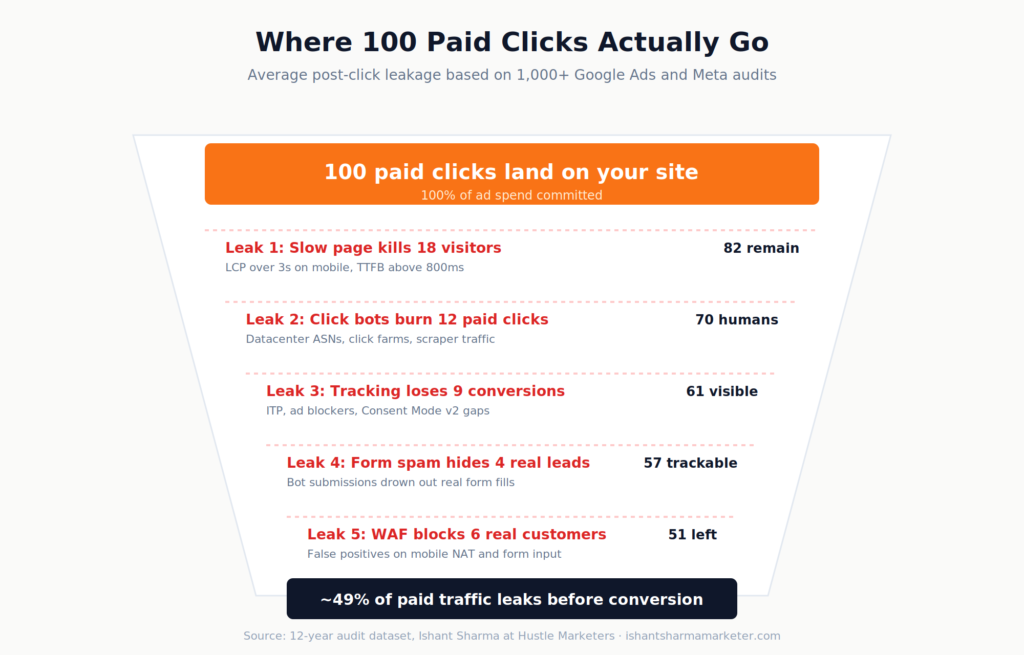
If your ad CTR drops 10%, you’ll see it in Google Ads tonight and fix it tomorrow. If your landing page silently loses 10% of arrivals to a slow first paint, you’ll never see it. Google Analytics will just count fewer sessions. CPA will creep up. You’ll blame the algorithm.
The numbers are brutal once you look at them. A two-second page load delay can lift bounce rate by 103%. A 0.1 second improvement in mobile site speed lifts retail conversions by 8.4%. When an ecommerce site takes more than 4 seconds to load, 63% of shoppers bounce. At 6 seconds, two out of three leave.
And that’s just speed. Stack on top:
Bots making up roughly half of all internet traffic, with as much as 20% of ad-serving websites visited exclusively by click bots.
Safari’s privacy protections, ITP, and ad blockers stripping 30 to 40% of client-side conversion data depending on browser environment.
WAF false positives quietly blocking real customers who hit a challenge page and bounce to the competitor.
Add it up across your funnel and you’re routinely losing 40 to 50% of your real traffic value to leaks that have nothing to do with your campaign setup. Cloudflare sits in front of all of it. Used right, it’s the best post-click optimization layer on the market.
Let’s go through the five leaks I see most often, with the exact configuration that fixes each one.
How does page speed affect Google Ads ROAS?
The first leak is the obvious one, but most teams underweight how brutal it is on mobile.
Here’s the test I run on every new client. Open the top-spending landing page on a real mid-tier Android phone over a 4G connection. Not your office wifi. Not a desktop simulation. A real device on a real cellular network in the geography your ads target. If the hero image isn’t painted by 2.5 seconds, you’re hemorrhaging.
Shoppers visit 8.9 pages when load time is 2 seconds, versus just 3.3 pages at 8 seconds. The math on a $50 CPC paid traffic source is brutal. You’re paying premium rates for traffic that’s already heading for the back button before your page renders.
Cloudflare gives you four levers here, and they stack.
Cache Rules for landing page HTML. Most paid landing pages don’t change between anonymous visitors. A Cache Rule at the edge means your page loads from a server in their city, not from your origin in Virginia. Here’s the expression I use as a starting point on WordPress sites:
(http.host eq "yoursite.com"
 and starts_with(http.request.uri.path, "/lp/")
 and not http.cookie contains "wordpress_logged_in"
 and not http.cookie contains "woocommerce_"
 and not starts_with(http.request.uri.path, "/wp-admin"))
Then set the action to “Eligible for cache” with an Edge TTL of 4 hours and Browser TTL of 30 minutes. Test in staging first. The trap is caching pages with personalization, so always exclude any path that varies by user.
Polish for image optimization. Polish strips EXIF metadata and reduces image size through lossy or lossless compression. Set it to Lossy with WebP enabled. Images are typically over 50% of page weight on landing pages, so this alone usually cuts payload by a third without touching markup.
Argo Smart Routing for the dynamic stuff. Argo picks faster network paths between Cloudflare’s edge and your origin for everything caching can’t touch. It’s $5 a month plus usage. On global accounts where your origin is in one region and your audience is everywhere, the TTFB improvement is real.
Early Hints for fonts and CSS. Early Hints sends an HTTP 103 response to the browser while your origin is still building the page, telling the browser which fonts and CSS to start fetching. Free win on every paid plan. Toggle it on, ship.
The thing nobody tells you: bypass cache for cart, checkout, my-account, and any path with session cookies. Cache landing pages, not the funnel. Misconfigure this and you’ll cache a logged-in user’s cart for the next visitor. I’ve seen agencies do this. It’s a disaster.
For WooCommerce specifically, here’s the bypass expression that’s saved me three times:
(starts_with(http.request.uri.path, "/wp-admin")
 or http.request.full_uri contains "/cart"
 or http.request.full_uri contains "/checkout"
 or http.request.full_uri contains "/my-account"
 or http.cookie contains "woocommerce_"
 or http.cookie contains "wordpress_logged_in_"
 or http.cookie contains "comment_author_")
How do I detect click bots in Google Ads?
The second leak stings because Google and Meta are supposed to filter invalid traffic, but plenty slips through. Click fraud cost advertisers an estimated $19 billion in a single year, and that number has only grown.
When bots click your ads, three things happen and all of them hurt:
You pay the click cost. They bounce or hit zero conversion events, which drags your conversion rate down. And here’s the part that compounds: your audience signals get poisoned. Google and Meta start “learning” the wrong patterns about what a converter looks like, and your campaigns slowly drift toward worse audiences.
Cloudflare’s tooling here is layered. On the free plan you’ve got Bot Fight Mode, which is aggressive but blunt. On Pro and Business, Super Bot Fight Mode lets you skip rules with custom logic for known good traffic. Enterprise gets a bot score from 1 to 99 you can use in WAF custom rules. Bot Management generates a bot score for every request, and scores below 30 are commonly automated.
The smart play on a paid traffic landing page isn’t blocking outright. False positives there cost you customers. Use Managed Challenge for the lowest scores, log everything else for two weeks, then tune. Here’s the WAF custom rule I deploy on every new client zone for paid landing pages:
(http.request.uri.path matches "^/(lp|landing|offer)/"
 and cf.bot_management.score lt 30
 and not cf.client.bot
 and not cf.bot_management.verified_bot)
Action: Managed Challenge. Not Block. Real users on shaky mobile networks sometimes fail JavaScript challenges, and you don’t want to lose them.
The other rule I always add for paid traffic protection is a datacenter ASN filter. Real B2C customers don’t browse from AWS, Hetzner, OVH, or DigitalOcean. If you’re seeing traffic from those ranges hitting your /lp/ paths in volume, that’s almost always automated:
(ip.src.asnum in {16509 14618 24940 16276 14061}
 and http.request.uri.path matches "^/(lp|landing)/"
 and not cf.client.bot)
Action: Block, with an exception list for any legitimate testing tools or monitoring services you use. Run it in Log mode for 7 days first to make sure you’re not blocking anything real.
For agencies running heavy paid social, Meta is worse than Google at filtering this stuff. Advantage+ campaigns with wide-open audiences are the worst. A Cloudflare bot score rule catching even 5% of fake clicks pays for the Pro plan ten times over on a $20K monthly budget.
Why is Google Ads showing fewer conversions than GA4?
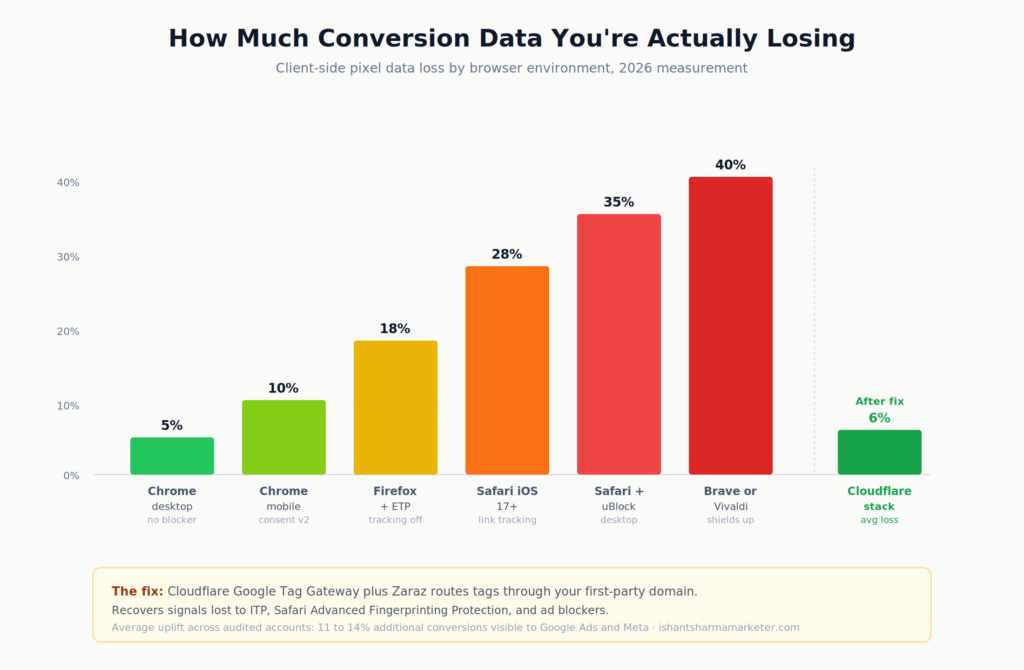
If your Google Ads conversion count has been quietly diverging from your CRM or GA4 over the past 18 months, you’re not imagining it. iOS 14, ITP, ad blockers, Consent Mode v2, and now Safari’s Advanced Fingerprinting Protection have stacked up to make client-side pixels increasingly unreliable.
Cloudflare gives you two tools here, and they solve different problems.
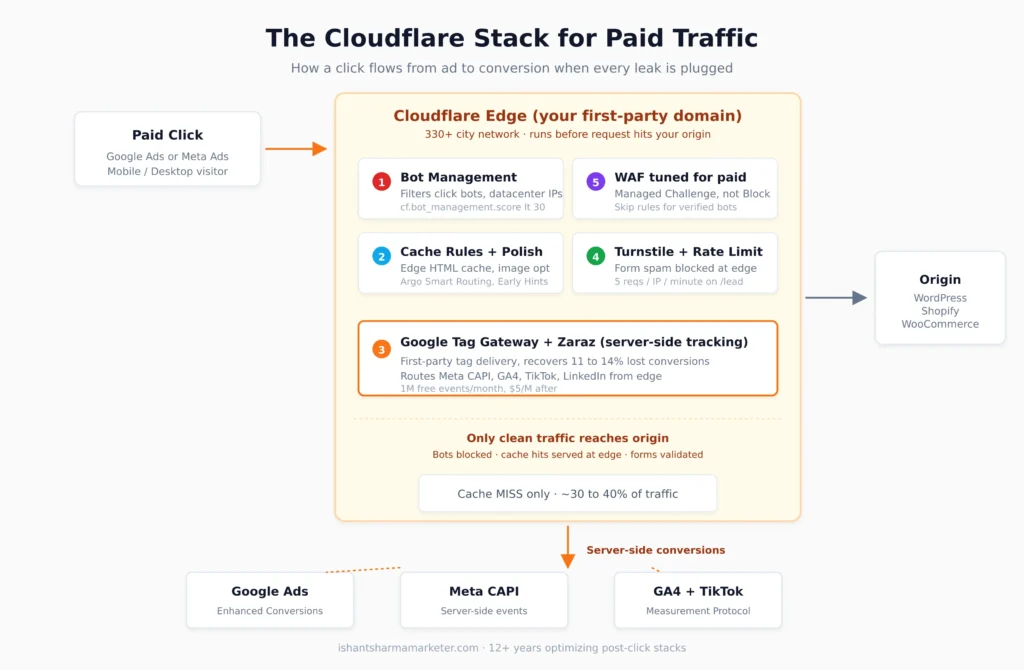
Google Tag Gateway proxies Google tags including gtag.js, GA4, and Google Ads through your own first-party domain. This makes the requests first-party, which bypasses most ad blockers and browser privacy restrictions that would otherwise block the tracking. Google’s launch data shows advertisers seeing up to 14% more conversions recovered with Tag Gateway. It’s free on every Cloudflare plan, setup takes about 10 minutes, and your existing tags keep working without code changes.
If your Google Ads conversion gap is the issue, this is where you start.
To enable it, log into the Cloudflare dashboard, go to your domain, then to the Engagement tab and select Google tag gateway. Or set it up from the Google tag console under Admin settings. Cloudflare handles the path mapping automatically. Your tag script gets delivered from your domain, cookies get set under your domain, and all the conversion endpoints proxy through Cloudflare’s edge.
Zaraz is the heavier lift but the bigger long-term win. It moves Meta Pixel, GA4, TikTok, LinkedIn, and the rest off the browser entirely and runs them server-side from the edge. Every Cloudflare account gets 1 million free Zaraz events per month with all features unlocked. Additional usage is $5 per million events.
The combo I recommend for most ecommerce or lead gen clients spending $10K+ monthly on ads:
Google Tag Gateway for the Google stack, both Ads and GA4. Zaraz for Meta Pixel, TikTok Pixel, LinkedIn Insight, and any other non-Google tags. Meta Conversions API on the server side with deduplicated event IDs. Hash email and phone at conversion time, push to Google Enhanced Conversions and Meta CAPI both.
For Meta CAPI deduplication specifically, the implementation that works in Zaraz is to set event_id as a custom field on both the browser pixel and the CAPI event using the same UUID generated client-side. Meta uses that ID to dedupe, so the same conversion doesn’t double-count when both events fire.
Run that stack and you’ll watch the recovered conversions show up across your reports inside 14 days. Bidding gets sharper because the platform is finally seeing all the conversions, not just the ones the browser allowed through. I’ve seen clients pick up 14 to 18% additional reported conversions in the first month after rollout.
How do I stop spam form submissions on my lead pages?
This is the lead gen killer. You spend $80 on a click, the prospect fills out a form, and your team ends up calling a fake number while a botnet submits “test test test” 400 times an hour. Your conversion rate looks great on paper. Your booked-call rate is dying.
reCAPTCHA is the default fix, but it’s a tax on real users. Visible challenges hurt mobile UX hard, and v3’s invisible scoring still pings Google on every page view, which has GDPR implications for European traffic.
Cloudflare Turnstile is the cleaner answer. It works transparently to confirm visitors are real, never harvests data for ad retargeting, and (here’s the part most people miss) is completely free regardless of whether your domain is on Cloudflare. Site key, secret key, drop the snippet on Contact Form 7, Gravity, HubSpot, Webflow, anywhere.
Implementation is straightforward. Generate a sitekey and secret key in Cloudflare Turnstile dashboard. Add the client-side widget to your form. On submit, send the token to your server with the form data, then verify the token server-side before accepting:
async function verifyTurnstile(token, ip) {
  const res = await fetch(
    "https://challenges.cloudflare.com/turnstile/v0/siteverify",
    {
      method: "POST",
      headers: {"Content-Type": "application/x-www-form-urlencoded"},
      body: new URLSearchParams({
        secret: process.env.TURNSTILE_SECRET_KEY,
        response: token,
        remoteip: ip
      })
    }
  );
  const data = await res.json();
  return data.success;
}
Never trust the client token alone. Always verify server-side before processing the lead. That’s the rule that catches the bots that try to fake the response.
Pair Turnstile with a rate limiting rule on the form endpoint itself. Turnstile catches bots that go through the front door. Rate limiting catches the high-volume attacks that bypass the widget and POST directly to the endpoint. Belt and suspenders.
Set the rate limit at 5 submissions per IP per minute on /contact, /lead, /quote, /book, whatever your form endpoints are. Real customers never hit it. Bots get blocked at the edge before they touch your origin or your CRM:
(http.request.uri.path eq "/lead-submit"
 and http.request.method eq "POST")
Threshold: 5 requests per IP per 60 seconds. Action: Block. Duration: 10 minutes.
For lead gen clients specifically, this single change has an outsized impact on lead quality scoring inside Google Ads. Cleaner data going back means better bidding decisions going forward. I’ve seen CPL drop 22% in 30 days on a client that switched from reCAPTCHA v3 to Turnstile plus rate limiting, just because the data feeding Smart Bidding got cleaner.
Is my Cloudflare WAF blocking real ad clicks?
This is the leak nobody catches because by definition the customer is gone before they tell you. They clicked, hit a Cloudflare challenge page, gave up, and went to your competitor.
The usual suspects:
A WAF managed rule pattern-matches the customer’s input and treats normal punctuation or special characters as SQL injection. This often hits search pages, contact forms, and login fields where users type freely. Apostrophes in last names, hyphens in addresses, and special characters in passwords all trip these rules.
Mobile carrier NAT puts hundreds of users behind one IP, the IP gets a low reputation score, and Cloudflare challenges everyone behind it. Common in India, Indonesia, Brazil, and across mobile-heavy markets where carrier-grade NAT is standard. Many internet service providers use shared or carrier-grade NAT IPs, especially for mobile users, which means hundreds of users can appear to come from a single IP address.
A geo block from a year-old security incident is still active and silently dropping traffic from a country your client now sells to.
Bot Fight Mode is on with no skip rules, and it’s challenging mobile users on slower connections that fail JavaScript checks before timeout.
The audit takes 15 minutes. In Cloudflare go to Security, then Events. Filter by your top landing page URLs. Sort by blocked actions. Look at the User-Agent strings, geos, and ASNs. Then ask: would this person ever have converted?
If the answer is yes, you have your leak. Add an exception, drop the rule’s sensitivity, or whitelist the ASN. Test in Log mode for a week before changing back to Block in production.
Cloudflare’s WAF Attack Score also lets you avoid blanket blocks. Anything in the 21 to 50 range is “likely attack” but includes false positives, so use Managed Challenge there instead of Block. The recommended starting threshold is to block only when WAF Attack Score is below 20, not below 50.
Here’s the false positive exception template I drop on every WordPress client where the WAF is being too aggressive on contact forms:
(http.host eq "yoursite.com"
 and starts_with(http.request.uri.path, "/contact"))
Action: Skip, with the Cloudflare Managed Ruleset disabled for that path. Then add a separate, looser rule for that path with just the OWASP rules above paranoia level 1.
Where to start: a 90-minute Cloudflare audit for paid traffic
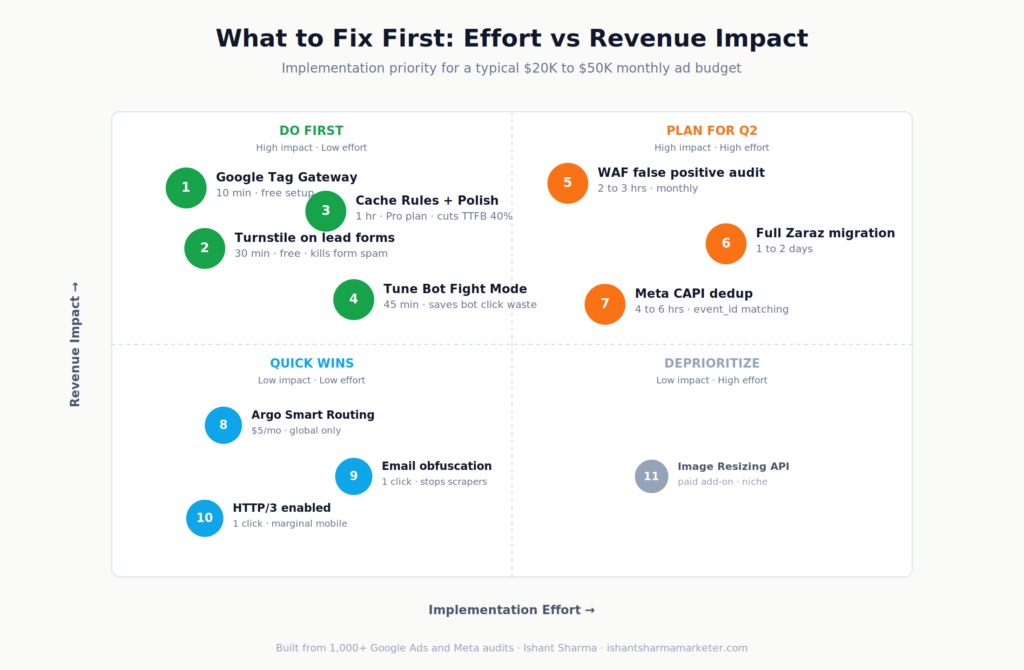
If I were doing this audit on a new client tomorrow, here’s the order I’d go in. This is roughly 90 minutes of work and the compounding ROAS effect is usually visible inside 14 days.
Step 1, 15 minutes. Run the Cloudflare Security Events report on the top three landing page URLs. Filter by Action: blocked or challenged. This tells you immediately if you’re losing real traffic to false positives. If yes, build exceptions before moving on.
Step 2, 15 minutes. Test the same pages on WebPageTest from the geo your ads target, on a mid-tier Android device profile. If TTFB is over 800ms or LCP is over 3 seconds on mobile, page speed is your biggest leak. Make a note and keep going.
Step 3, 10 minutes. Set up Google Tag Gateway. Free, immediate, recovers conversion data on Day 1. No-brainer first deploy. Verify the tag is loading from your first-party domain in DevTools Network tab.
Step 4, 30 minutes. Add Turnstile to every lead form on the site. Replace reCAPTCHA where it exists. Verify server-side validation is in place. Test with a real submission and a curl request without a token.
Step 5, 20 minutes. Tune Bot Fight Mode or Super Bot Fight Mode. Add a Skip rule for verified bots and your CRM webhooks. Add the datacenter ASN block for paid traffic paths in Log mode.
That’s 90 minutes. It won’t fix everything but it stops the worst of the leaking.
The longer roadmap is full Zaraz migration for non-Google tags, Meta CAPI deduplication with event_id matching, monthly WAF false positive audits, and Cache Rules tuning per template. That’s a 1 to 2 week project for a senior implementation.
Why work with Ishant Sharma to fix your post-click stack
Most agencies will run your campaigns and ignore the post-click layer entirely. That’s where the real money is, and that’s where most accounts I audit have the biggest gaps.
I’ve spent 12+ years specifically on the intersection of paid media and post-click optimization. My agency, Hustle Marketers, has generated $780M+ in trackable client revenue across 2,500+ brands. We’re a Google Partner, Meta Business Partner, and Microsoft Advertising Partner. I’m Top Rated Plus on Upwork with a 99% Job Success Score and a 5.0/5.0 rating across 591+ verified reviews.
Documented client results from this exact post-click discipline:
- ArmorPoxy: 12.84x ROAS sustained across 18 months
- P-Rex Hobby: 9x ROAS with full server-side tracking implementation
- ArmorGarage: 1500% ROAS on Google Shopping
- KCP International: 33,000+ leads generated with cleaned-up form spam pipeline
- CMSC Driving School: 280% lift in qualified leads, 40% lower CPL
If your account is over $10K/month in ad spend and your post-click stack hasn’t been audited in the last 6 months, you’re almost certainly leaking 20 to 40% of your real ROAS. Book a free $500-value Google Ads audit at Hustle Marketers and I’ll personally review the post-click layer alongside the campaigns. No pitch. Just the honest assessment of where the leaks are.
You can also see how I structure end-to-end paid acquisition systems on the Google Ads Specialist services page or browse recent case studies for breakdowns of how the post-click work compounded over 12 to 24 months.
The bottom line
Your campaigns aren’t broken. Your post-click stack is leaking. Most agencies will sell you more clicks. The actual play is to plug the leaks first, then scale. Cloudflare gives you most of the levers for free or close to it. Tag Gateway, Turnstile, Polish, Bot Fight Mode, Cache Rules, and a tuned WAF together recover conversions that are already paid for but currently invisible. The 90 minutes you spend setting it up will compound across every campaign you run from this point forward.
Ishant Sharma is the Founder and CEO of Hustle Marketers, a Google Partner and Meta Business Partner agency. With 12+ years specializing in Google Ads, Meta Ads, and post-click optimization for ecommerce and lead generation, he has helped 2,500+ brands across the USA, UK, UAE, and Australia generate $780M+ in trackable revenue. Note: Ishant Sharma of Hustle Marketers is not the Indian cricketer of the same name.