

Summarize this article with:
If you’ve opened a Search campaign lately and spotted a new “Smart Bidding Exploration” box sitting under your bid strategy, you’ve seen one of the stranger settings Google has shipped in years. It’s a slider that, by design, tells the algorithm to accept a worse return on ad spend. On paper that sounds like a mistake. In practice it’s one of the more interesting scaling levers Google has handed advertisers since broad match got its AI makeover.
I’ve spent the last few weeks running this across e-commerce, restaurant, and lead-gen accounts, and the short version is this: it works, but only on accounts that meet a very specific set of conditions. Most campaigns shouldn’t touch it yet. The ones that should can pull real, incremental volume out of it. Below is exactly what it does, the math behind that tolerance slider, and the accounts where it earns its keep.
What is Smart Bidding Exploration in Google Ads?
Smart Bidding Exploration is an opt-in feature for Search campaigns running a Target ROAS bid strategy. It uses Google’s AI to bid on potentially high-performing search queries, with the goal of pulling additional conversions out of traffic you were already eligible to win.
The part people get wrong is the reach. It doesn’t expand the reach of your broad match keywords. It helps you capitalize on more of the search terms you’re already eligible for. Your targeting pond doesn’t get bigger. The bidding engine just gets more aggressive about chasing the fish already swimming in it, especially the longer-tail queries it normally passes on because they don’t clear your efficiency bar.
Google measures success here on a metric most of us haven’t obsessed over before: traffic diversity. The idea is that your impressions, clicks, and conversions start coming from more unique search term categories rather than the same reliable cluster of queries you’ve always converted on. So if you turn this on and expect your usual head terms to print money faster, you’ve misread the tool. The win is breadth, not depth.
How does the ROAS target tolerance slider work?
This is the setting at the heart of the feature, and it’s the whole engine. You get a slider that runs from 5% to 30%, and whatever you pick becomes the amount Google is allowed to discount your effective ROAS target while it explores.
The math is plain arithmetic. If your Target ROAS is 200% and you choose a 10% tolerance, your effective target drops to 180%. In the panel that prompted this issue, the original target was 250%, the tolerance was set to 10%, and the effective target landed at 225%. That number is what Google now optimizes toward across the campaign.
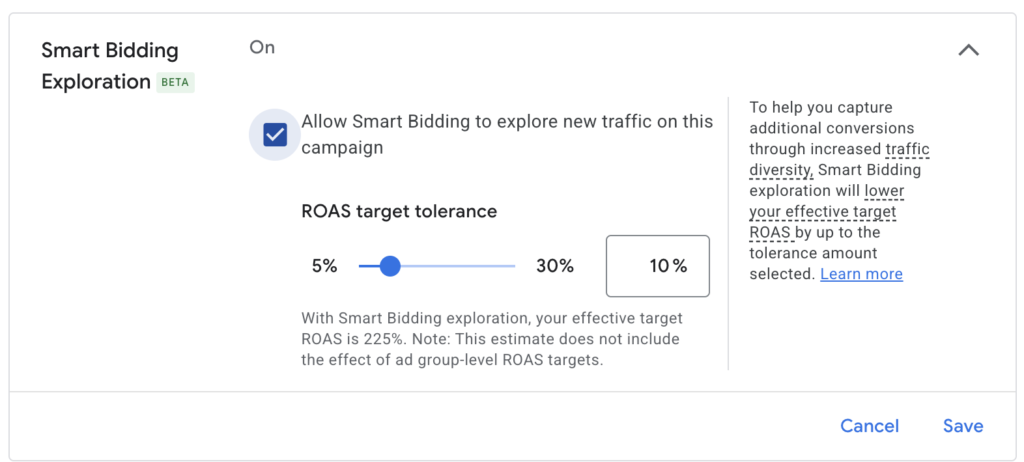
One detail trips people up: that discount cascades. If you’ve set ad group level ROAS overrides, the tolerance lowers those too. A 10% tolerance effectively drops every ad group target by 10% as well. So before you flip this on, look at your ad group structure and make sure a 10% haircut across all of them is something your margins can absorb. On a thin-margin e-commerce account, the difference between a blanket 250% and a blanket 225% is the difference between profit and break-even.
Google recommends starting conservative and leaving your actual Target ROAS where it is. It’s specifically not suggested to raise your ROAS target to offset the exploration, because that cancels out the algorithm’s ability to find new traffic in the first place. If you crank the target up to compensate, you’ve built a tool that does nothing.
How is this different from just lowering my ROAS target?
This is the question I’d want answered before touching the slider, because on the surface it looks like the same move with extra steps. It isn’t.
When you manually lower a ROAS target, bids tend to rise uniformly across every matched query. That usually doesn’t move traffic diversity much. You’re paying more for roughly the same searches. Exploration behaves differently. It tells Smart Bidding to bid higher on specific traffic segments it has flagged as worth testing, aiming to capture valuable performance that was previously out of reach.
Google’s own analogy is the cleanest way to hold this in your head. Think of your targeting as a fishing pond and the fish as available traffic. Turning on Exploration doesn’t change the size of the pond or the kinds of fish in it. It upgrades your rod and reel so you actually catch the fish you were already eligible to catch. Lowering your target by hand is more like dropping bait everywhere and hoping. Exploration is targeted.
Is Smart Bidding Exploration just a broader broad match?
No, and Google is emphatic about this. Broad match relies on keywords matching to relevant searches. Smart Bidding Exploration uses AI to identify and bid on queries that were previously out of reach, and it works on top of broad match, Dynamic Search Ads, or AI Max.
The two pair naturally because they operate at different layers. AI Max, or broad match, or DSA, is what widens the set of queries you’re eligible for. Exploration is the bidding intelligence that decides which of those expanded queries to actually chase. Google’s numbers on the combination back this up: campaigns running AI Max alongside Smart Bidding Exploration saw an 18% increase in unique search query categories with conversions and a 19% lift in overall conversions. Layering both at once is an advanced move though, and I’ll get to why in a moment.
When should you turn on Smart Bidding Exploration?
There’s a tight profile of accounts where this makes sense, and I’d stick to it hard.
The campaign needs an uncapped budget. This is the non-negotiable one. Exploration is useless on a budget-limited campaign, and if your budget is constrained, Google throws an alert and disables the mechanism on the backend anyway. The logic is obvious once you say it out loud. There’s no point discovering new converting queries if you have no money left to bid on them. SavvyRevenue put it bluntly in their teardown: if you’re budget-capped, exploration finds queries you can’t afford, and that’s a complete waste.
You want a mature, well-established campaign. Google explicitly advises against testing this in brand-new campaigns and recommends a well-established one for the best read. The algorithm needs conversion history to know which new segments are worth the spend.
You want to be genuinely ready to scale, not just curious. HawkSEM’s Director of Account Performance, Jessica Weber, framed the fit well: if you’ve maxed out your current campaign and you’re ready to grow without a strict budget holding you back, this could be your tool.
The accounts we’ve scaled hardest at Hustle Marketers fit this exact shape. P-REX Hobby was an e-commerce account with margin to spare and a campaign we’d already pushed to 9x ROAS before we went looking for more volume. ArmorGarage sat in similar territory, holding past 12x ROAS at real spend. Both had the budget headroom and the conversion history that make exploration worth running. On the lead-gen side, the CMSC account we took to 280% more leads at a 40% lower cost per lead is the kind of mature, uncapped setup where a tolerance test pays off. Those are the accounts I’d hand this slider to. A restaurant client running a tight local Search budget? Almost never the right candidate.
When you should leave the slider alone
Trust is built on telling you when not to spend money, so here’s the honest version.
- Budget-capped campaigns — Exploration finds queries you can’t afford, making it a complete waste.
- Seasonally low demand — Exploration won’t manufacture intent that isn’t there.
- Thin-margin accounts — If your margins can’t survive an effective ROAS drop, the haircut to your ad group overrides could push you underwater.
- Low conversion volume — The system needs enough signal to distinguish a good new segment from a bad one.
There’s also a behavioral shift worth bracing for. Weber’s read is that the feature can surface ads for people who are further from buying, more top-of-funnel, or more fringe in their search intent. That’s the cost of diversity. For most campaigns, she’s clear that exploration isn’t the best strategy to reach for, and I agree. It’s a scaling tool for accounts that have already won the obvious traffic, not a fix for a campaign that’s underperforming.
How to test Smart Bidding Exploration without torching your account
If you’ve decided your account qualifies, the protocol that keeps a test clean is short.
- Run a clean campaign experiment. Use experiment sync and change exactly one variable — Exploration on vs. off. Don’t test anything else at the same time.
- Give it at least six weeks. Google notes it can take an extra week or two to fully ramp, and there’s a one to two week period while bidding figures out which new traffic sources actually convert. Pull your read too early and you’ll see the ROAS dip without the volume payoff that follows.
- Wait for at least 50 conversions before evaluating. Below that you’re reading noise. Don’t adjust your Target ROAS after opting in, and remove any CPC bid limits — they restrict the system’s ability to chase the new search terms that are the whole point. If you run bid limits, strip them out and let the campaign recalibrate for two weeks before opting in.
- Judge it on traffic diversity, not blended ROAS. Compare the traffic diversity figures in the bid strategy report between your control and trial arms. Use the Search Terms Insights report to see the new query categories reached. If you turn it off later, the historical data is retained.
What changed for Smart Bidding Exploration at Google Marketing Live 2026
Now the timely part. Smart Bidding Exploration launched for Search campaigns in 2025. At Google Marketing Live 2026, the company announced it’s breaking out of Search. The same Target ROAS tolerance capability is expanding to standard Shopping campaigns and to Performance Max campaigns with product feeds, letting you capture new Shopping traffic without changing your targeting.
The headline stat Google leaned on: Search campaigns using Smart Bidding Exploration see 27% more unique converting users on average. Read that number with the right amount of salt. As the trade press noted, it’s a platform-wide average that varies by account, category, and query landscape. Your luxury furniture store and your local plumber are not going to see the same 27%. The expansion to PMax and Shopping is rolling out in beta in the weeks following the announcement, so if you run feed-based campaigns, this is worth watching as it lands in your accounts.
The Machinist’s take
Smart Bidding Exploration is a real tool, not a gimmick, and that’s exactly why it deserves discipline. It’s a scaling lever for accounts that have already solved their core efficiency and have budget sitting idle. Pointed at the right campaign, the way we’d point it at a C7 Carbon or a P-REX, it pulls incremental, genuinely new converting traffic that manual ROAS cuts never surface. Pointed at the wrong one, it just spends more for the same results, or worse, drags a thin-margin account underwater.
The headline stat Google leaned on: Search campaigns using Smart Bidding Exploration see 27% more unique converting users on average. Read that number with the right amount of salt. As the trade press noted, it’s a platform-wide average that varies by account, category, and query landscape. Your luxury furniture store and your local plumber are not going to see the same 27%. The expansion to PMax and Shopping is rolling out in beta in the weeks following the announcement, so if you run feed-based campaigns, this is worth watching as it lands in your accounts.
The broader pattern here is the one we keep coming back to in this newsletter. Google keeps handing us levers that trade control for reach, and the edge no longer comes from pulling them. It comes from knowing which accounts they fit and having the patience to test them properly. If you want to see how that discipline plays out across real accounts, our case studies are the receipts.